One name for the game

Two abandoned websites, 1,104 redirects, and a launch day with numbers

M.A.G.U.S. Kártya is a Hungarian collectible card game that has been played since 1997. Until this August it had two websites, and neither was maintained: the first had been abandoned for years, the second had been losing images for a while and did not work on phones. This post is about the decisions that turned them into one site, not about the migration scripts. The community those sites serve is the same one that plays on my side project, maguskartya.app: a virtual tabletop, an online table where players meet each other with their own decks, plus a machine opponent for newcomers that plays by heuristics on a reduced card pool. The two sites are connected at the end.

What was there

The publisher’s portal went online in 2004 and published its last article in 2021. It holds 1,984 articles, 1.49 million words by 36 authors. Its catalogue of expansions stops years before the current ones. It also serves every article page cut off after its title, because the theme’s comment counter queries a database that no longer exists. I had admin access, and the other admins confirmed what the pages showed: nobody was maintaining it.

The fan team’s WordPress site took over in 2021. It had the current content: 73 pages, 470 posts, 523 tournament dates, 2.7 GB of images. It also had a domain named after the team rather than the game; forty expansions buried three menu levels deep, with a whole decade of releases missing from the list; not one card image with alt text, the description a screen reader or a search engine uses instead of the picture; and 4,307 images hotlinked, embedded straight from other people’s servers, about half of them from servers that had since disappeared. At some point the hosting quota ran out, a cleanup nobody could reconstruct afterwards deleted a large share of the uploaded images, and pages loaded with holes.
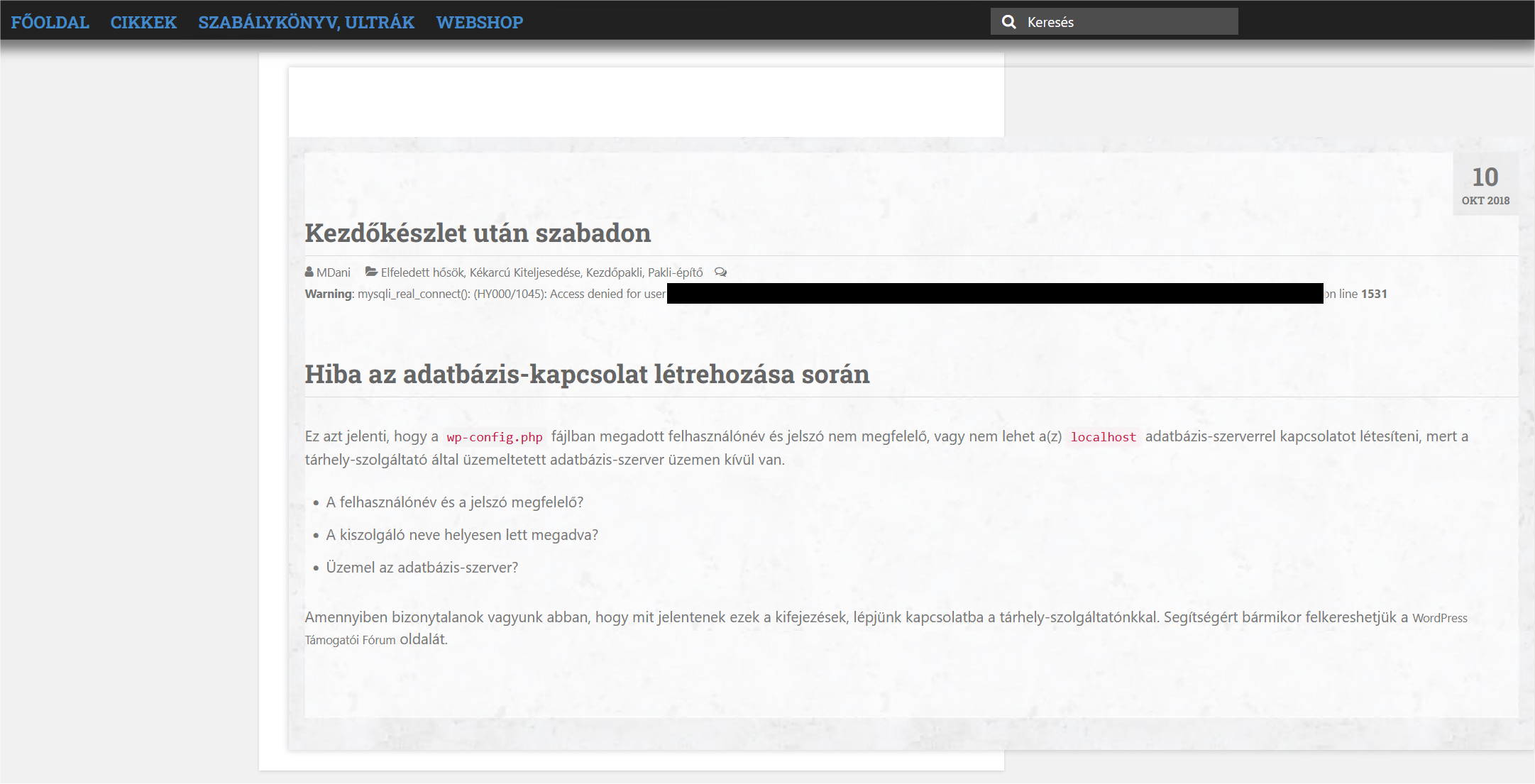
An article page on the 2004 portal: below the title, a PHP warning and WordPress's database-connection error stand where the article body should be.
An article page on the publisher’s portal, a post from October 2018. The body is gone; in its place, the database error. Hungarian UI: “Hiba az adatbázis-kapcsolat létrehozása során” means “Error establishing a database connection”. Database user and server path redacted.

None of that is unusual for a volunteer-run site of a small community. The unusual part was treating it as one product to build instead of two sites to repair.

Four decisions before any code

The name is the product. The new domain is maguskartya.hu, the game’s name. The team’s name, Fekete Határ Szindikátusa, is one paragraph on the About page. A search for the game should land on the game, and a newcomer should not have to learn who the syndicate is before finding the rules. The site also uses the same colour palette as the online table, so the two read as one family.

Keep everything, edit nothing written by people. Both sites’ content moved: every article back to 2004, every tournament date, 6,862 card records, and 69 product pages, one for every release since 1997, including the decade that neither old site listed. The 2004 portal’s articles came through its RSS feed, because its API was closed. Article text lost its formatting debris and nothing else. Factual errors on the rules pages were corrected, and each correction was written down. Every image now lives on the site’s own host, converted to WebP, a compact image format: 2.7 GB became 516 MB with no loss of resolution.

The catalogue is data; WordPress only renders it. A release has cards. A card has a record with its printed number, its name, its rarity and a few flags. A tournament format lists the releases it allows, plus its bans and restrictions. An ultra card belongs to a release like any other card. All of it lives as JSON files in a git repository, one folder per release, one record per card next to its image. No product page or format page is edited by hand: a script reads the repository and regenerates all 69 product pages, the format pages and the media library, and a format’s legal card pool is computed on every run instead of being stored anywhere. Hiding a card is one flag. Moving a release out of a format is one line. Either is followed by one run and one check. A page with three hundred images is not something a volunteer should edit in a browser. Two things came free with this: every product page lists its card names as text, which is what a search engine reads, and if the community ever outgrows WordPress, the data is already in the shape a purpose-built site would need. It cost a set of scripts, not custom software.

The files follow the same rule. On the old site one card sat in the media library as cc_phet_lehelet, cc_phet_lehelete and cc_phet_lehellete, next to files called image_234 or named after a print-sheet page number. An author who could not find a card uploaded it again, so duplicates piled up and ate storage. The same card is now one file, 3545-phet_lehelete-400x561.webp: catalogue number, printed name, pixel size. It carries the card’s name as alt text, is served in several sizes at a higher resolution than before, and sits in a media-library collection named after its release, Ősök ébredése, so an author finds it by number or by a fragment of the name. The untouched scans stay in the repository; the site itself never needs them.

Two entrances and a calendar. The old site served the active player well and nobody else. The new one opens with two pages, one for “I am new” and one for “I played years ago”, and both end at the tournament calendar, because the question a newcomer actually has is where they can play. The calendar answers it from data: about two events a week over the last twelve months, half of them in Budapest.

The redirect I refused, then measured

A 301 is a permanent redirect: the old address answers “this moved here”, and browsers and search engines follow. On August 9 I decided not to build one. The reasoning was that this was a new site, not a moved one. The old site would stay on its own domain, so old links would keep working there, and a deep link would have no matching page on the new site anyway.

On August 27 I compared the two sitemaps, the URL lists each site publishes for search engines. 466 of the 475 old article addresses mapped onto a new one with a single rule, a /cikkek/ prefix. The premise held for the pages and failed for 98% of the content. The decision reversed the same day. One number was enough, and the argument before it had rested on an assumption nobody had checked.

The audit that found 247 hidden 404s

The redirect rules were tested first on a spare subdomain against the old sitemap: 550 URLs, 550 landed on a live page, 511 on the exact target. That looked finished.

The day before the switch I simulated every URL I could find on the old site, not only the ones in the sitemap: 1,104 addresses, run through the rules in order and checked against both sites’ live data. 822 landed on target, 35 on the home page, and 247 would have ended in a 404. The cause was the events plugin’s sitemap, which lists only future events, so 244 of the 528 past tournament pages had been invisible to the first audit. After a second pass: 1,102 on target, two intentional home-page fallbacks, zero 404s, 339 rules.

One rule sits above all the others and does nothing visible. It exempts the certificate renewal path. A redirect is sent after the encrypted connection is set up, so the old domain needs a valid certificate for as long as the redirect exists. Without the exception, renewal would fail silently, and every old link would turn into a browser warning some months later.

Launch day

The new site had been live on its own domain for four days. The switch itself was one setting on the hosting panel, on a Sunday: the old domain now points at a folder that holds nothing but the redirect rules. A Facebook post in the community group announced it the same day.

The site measures with PostHog, a product-analytics tool, in cookieless mode: nothing is stored on the visitor’s device, so there is no consent banner. The same PostHog project measures the online table, split by host, and the links between the two carry source tags in both directions.

  • Launch day: 1,889 page views, 405 visitors. The next three days: 262, 157 and 146 visitors.
  • Where they came from on day one: Facebook 166, direct 175, Google 22. Seventeen arrived with the old domain as referrer: tabs still open on the old site, clicking through the 301.
  • 42% of page views so far came from phones. The old site was not built for them. The new card grid is three columns on a phone and nine on a wide screen, and the calendar turns into a list.
  • The two entrance pages were read by 86 and 56 people in four days.
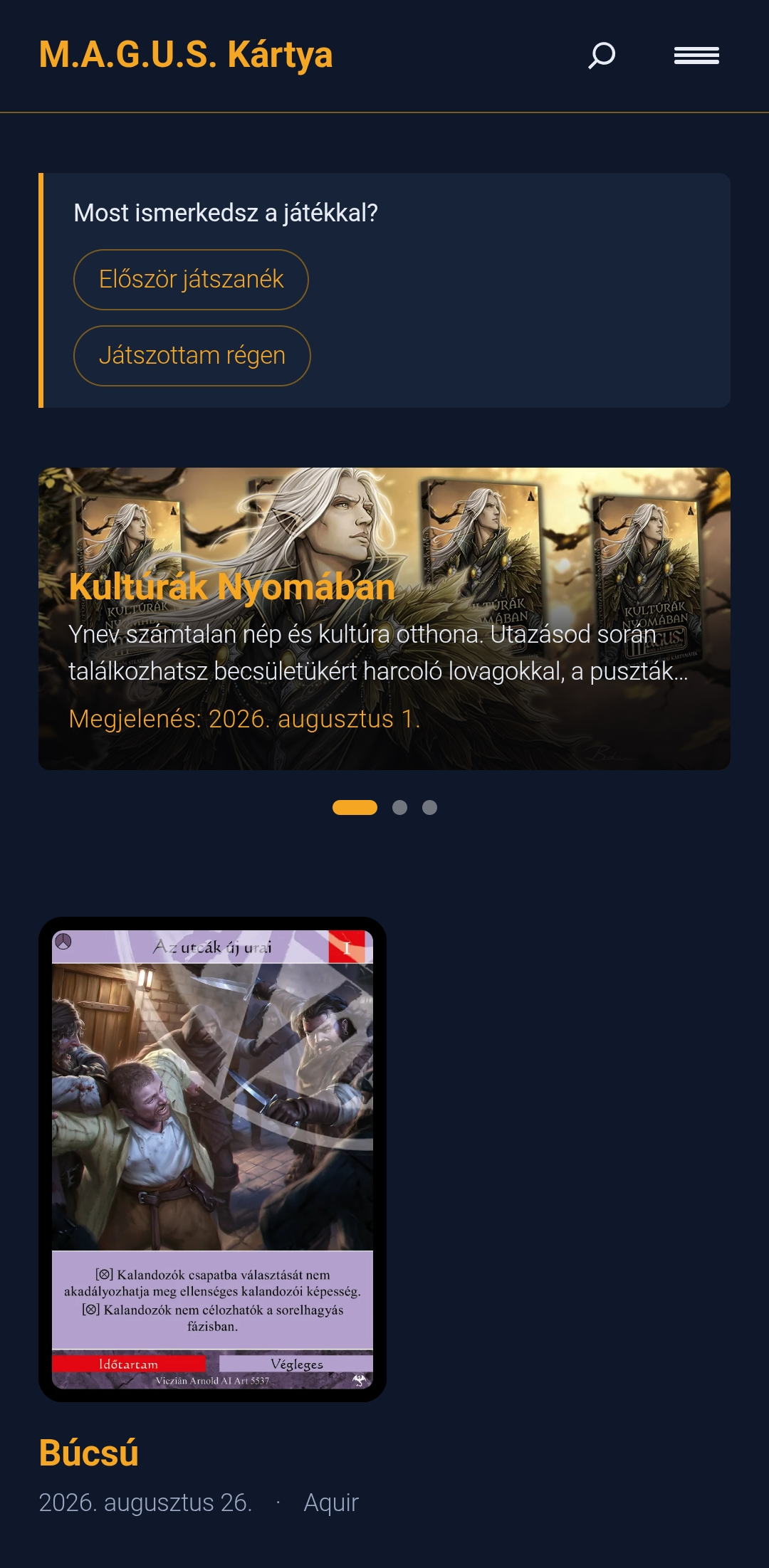
The maguskartya.hu home page on a phone: the site title, a box asking whether the visitor is new to the game with two buttons, the banner of the newest release, and the latest article.
The home page on a phone. Hungarian UI: “Most ismerkedsz a játékkal?” asks whether the visitor is new to the game; the two buttons are “I would play for the first time” and “I played years ago”. Below them, the newest release and the latest article.

The loop to the online table ran in one direction. 65 visitors went from the portal to the table in the first four days, 36 of them straight to the machine opponent. Bot matches started per day had been between one and five for three weeks; on launch day there were 30, and 23 of them were started by people who had come from the portal. Two registrations in the first 48 hours carried the portal’s tag. The other direction was quiet: nine clicks from the table back to the portal in a week. That number is small, and it stays in the post.

What it cost, and what stays reversible

Five weeks from the first inventory to the switch. The hosting is the shared plan the old site already ran on, paid a year ahead at about the price of a managed WordPress plan, with room for both sites. The old WordPress stays there, 10.6 GB of it, with no domain pointing at it: an inert archive, one panel setting away from being served again on its own domain. Google Search Console has the change of address. Nothing in the sequence was irreversible, and that was the condition for doing the switch on a Sunday.

Three things I would keep for any migration of this shape: measure the premise before deciding, because the “no redirect” decision had a number hiding behind it; treat a sitemap as a sample, not an inventory; and leave the old system in place until the new one has earned its traffic.

PeerJS public TURN relay

Finding, fixing, and verifying a relay I never chose

A follow-up to The follow-up file, where I argued that shipping a fix isn’t done until you’ve verified it moved a number. Here’s a case where I did.

The symptom

One Sentry error: negotiation-failed, one user, Safari/Mac, about 19 events in 25 minutes, then it recovered on its own. The kind of thing you write off as a bad network. I checked instead.

The numbers

My app (maguskartya.app) is a peer-to-peer card game over WebRTC, built on PeerJS – a small library that opens the browser-to-browser connections. I queried 90 days of production traffic – 20 players, 64 game sessions:

  • 58% of sessions hit a connection error, a blocking reconnect overlay, or repeated join attempts.
  • 41% showed the overlay; 75% of players were affected.
  • May looked the same. Not new, not rare.

The cause

I never set iceServers, so PeerJS used its default config. That default already includes a TURN relay – a free, shared, rate-limited public one (turn:eu-0.turn.peerjs.com:3478, credentials peerjs/peerjsp, port 3478, no TLS). When a direct connection failed, players relayed through that shared box. Anyone behind a firewall that blocks 3478 had no fallback at all.

So I wasn’t missing a TURN server. I was unknowingly depending on a bad one.

The fix

A dedicated relay – Cloudflare Realtime TURN. A small Vercel function (turn-credentials.ts) verifies the Clerk session, checks an allowlist claim, and mints a 24h credential. The client fetches it, caches it 23h, and uses it for every peer connection it opens.

The one trap worth knowing: PeerJS’s config replaces the defaults, it doesn’t merge. Pass your own iceServers and you silently lose the default STUN. Re-add it:

const turn = Array.isArray(data.iceServers) ? data.iceServers : [data.iceServers];
// peerjs's config REPLACES the defaults - re-add STUN or you lose it.
const servers = [{ urls: 'stun:stun.l.google.com:19302' }, ...turn];

This is a deliberate fallback: if my credential endpoint is ever down, fetching a credential fails, and instead of erroring out, the client just creates the peer with no custom config – so PeerJS uses its old default, the public relay. Players stay connected on a worse relay rather than not connecting at all.

Did it work

Two matched 23-day windows, before and after the deploy, normalized per game so a drop means each game got smoother, not just that fewer people played:

  • Connection errors per game: 1.38 → 0.36 (-74%).
  • Reconnect overlays per game: 0.72 → 0.39 (-47%).
  • Games actually went up over the same period (130 → 161).

Direct check: 24% of established connections now relay through my own TURN – a quarter of connections genuinely need a relay, and now it’s mine, not the public one. Credential fetches succeed 100% of the time (202 fetches, 32 people).

Lessons

  • No iceServers in PeerJS doesn’t mean no relay – it means PeerJS’s shared public one. Find out how much of your traffic depends on it.
  • “Mostly works” isn’t a number. P2P failures self-heal, so a common problem looks like an edge case until you count it.
  • A meaningful fraction of users can’t connect directly and need a relay. If you didn’t set one up, you’re borrowing someone else’s.

The follow-up file

Closing the loop between an anomaly and a verified fix

It has been a few years since the last post. The reason is the most ordinary one I could give: a small human moved into the house, evenings stopped being my own, and writing took a back seat. The nights are getting easier now, and a little of the old energy is back.

I have been working on a small side project – an online tabletop platform for an old Hungarian card game called M.A.G.U.S. (maguskartya.app). A few lessons have come out of it that I want to write down before they fade. This is the first: the gap between “I shipped a fix” and “I know the fix worked”.

Sentry tells you that something crashed. PostHog does not. PostHog tells you that something happened, and lets you look at the pattern – how often, in what context, and to whom. So when a rare-by-design guard suddenly fires 171 times across 13 users, you notice. Then you fix the cause. Then comes the part nobody talks about: verifying that the fix actually worked. Sentry closes that loop for you. PostHog doesn’t. This is the file I keep to close it manually. I call it FOLLOWUPS.md.

The two tools, drawn cleanly

A quick line on the split, because the rest of this post leans on it. Sentry is an error-monitoring product: it catches crashes – uncaught exceptions, broken promises, things the user sees as “something went wrong”. When you ship a fix, the resolved error stays resolved; if it comes back, Sentry tells you. PostHog is a product-analytics tool (similar in role to Mixpanel or Amplitude): it tracks behaviour – the events you chose to instrument, the patterns you chose to watch. A signal in PostHog is almost always a rate: a thing that should be rare is happening more than rare, and the job is to find what changed. Fixing the cause is half the work. Going back days later to confirm the rate actually dropped is the other half, and PostHog will not raise its hand for you.

A concrete example

The same project has a netaction_anomaly event – a tracker I added to log any time the receiver’s authority check on an incoming action fails. The game is peer-to-peer, so each client validates the actions it receives from peers; if a guest sends an action that should only come from the host, the check trips and the event fires. It is the kind of guard I expect to fire once a year, on a real attack or a real bug.

I wired it as a PostHog event rather than a Sentry warning. Both would work – Sentry can capture warnings without crashes – but PostHog gives me the rate and shape of any anomaly across users, not just an issue page.

PostHog showed me it had fired 171 times across 13 distinct users over the past six weeks. The problem was not that the guard fired – a single fire on a real attack or real bug would have been normal. The problem was the volume: a once-a-year guard does not fire 171 times in six weeks. The breakdown was clean: same action type, same reason: "host_only", same sender_role: "spectator". Every guest joining a game was tripping the guard. Nothing was broken from the user’s point of view – the game played fine – but the anomaly stream was now drowning in false positives, and any real anomaly would be lost in the noise.

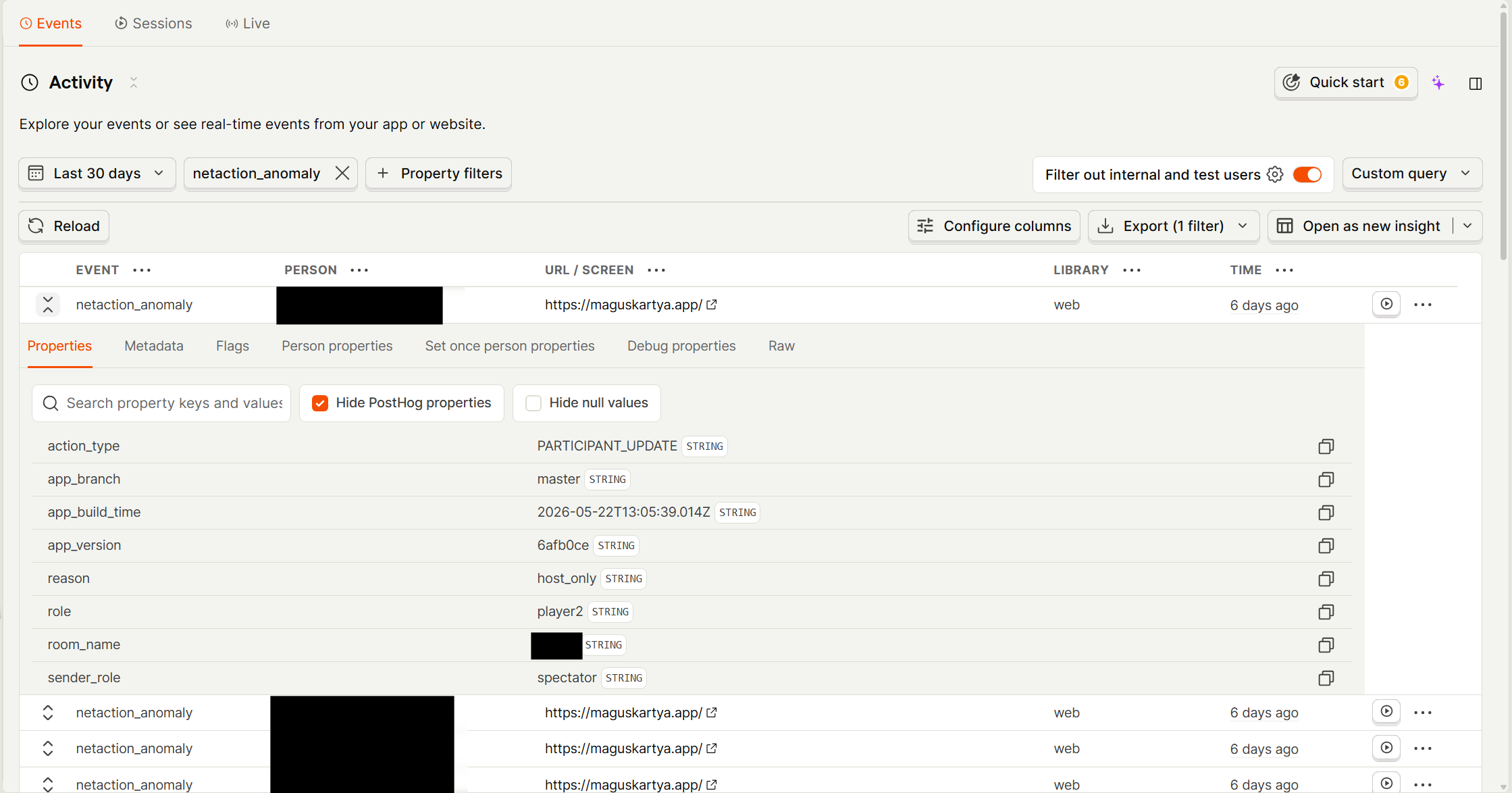
A single <code>netaction_anomaly</code> event in PostHog. The property breakdown is the diagnosis in one screen: <code>action_type: PARTICIPANT_UPDATE</code>, <code>reason: host_only</code>, <code>sender_role: spectator</code>. Every guest join produced the same shape.
One of the 171 events. Person column redacted.

The diagnosis took an evening. The host broadcasts a “participants updated” message to everyone in the room (including the brand-new guest who just joined), and then immediately starts a per-peer sync to bring that new guest up to speed. The order was wrong: when the guest received the broadcast, its local model of who is in this room was still empty, so the sender (the host) looked like a spectator to the receiver’s authority check. The guard fired. The payload was applied anyway – I run guards in track-only mode, but that is a different post – so gameplay was unaffected. The data stream was the only thing that knew.

The fix was a one-line swap: do the per-peer sync first, then broadcast. PeerJS – a thin WebRTC-data-channel library this project uses for peer connections – preserves per-connection message order, so the joining guest now receives sync → broadcast in the correct sequence, and the guard does not fire.

I committed the fix. And then I almost moved on.

The entry

Instead, I wrote one paragraph in a file called FOLLOWUPS.md. It looked like this (redacted):

## 1 - netaction_anomaly (PARTICIPANT_UPDATE / host_only / sender=spectator)
- Found via: PostHog query on <date>. 171 events across 13 users since the
project started tracking. Fires on essentially every game session with
a guest joining.
- Hypothesis: host-side join-message ordering race. <details>
- Fix applied: swapped call order in PeerService at <file:line>. Commit <hash>.
- Fix date: <date>
- Deploy date: <date> (cutoff for verification, set conservatively to land
after build + CDN propagation)
- Verify by: <date + 7 days>
- Verification query:
SELECT count(), count(DISTINCT person_id)
FROM events
WHERE timestamp >= <deploy>
AND event = 'netaction_anomaly'
AND properties.action_type = 'PARTICIPANT_UPDATE'
AND properties.reason = 'host_only'
AND properties.sender_role = 'spectator';
- Expected outcome: 0 anomalies AND at least one fresh guest join in the
window. If anomalies > 0, the ordering race is not the sole source.
- Resolution: pending

The same template, as a standalone file, is in the repo for this post.

The entry takes about ten minutes to write. The cost is small. The value is that on the verify-by date – which is on my calendar – I run the query and I know.

The sanity check – the part nobody tells you

Look at the “expected outcome” line. It has two clauses: zero anomalies AND at least one fresh guest join in the window. The second clause is the easy one to leave out.

If I run the query a week later and see zero anomalies, I might be looking at a working fix. Or I might be looking at a week where nobody used the affected feature. The data does not distinguish between “the fix worked” and “the bug had no opportunity to fire”. Without a paired traffic query, “zero” is meaningless.

Every entry in the file now has the sanity check baked in. If the success metric is “X dropped to zero”, there is always a second query asking “did the flow that produces X actually happen?” If both queries answer yes, the fix is verified. If only one does, I have a problem and a clue.

Why structured beats “I’ll remember”

Three weeks later, the original investigation is gone from my head. The PostHog dashboard looks slightly different – different time range, different aggregation, slightly different filters. I cannot re-derive what I was looking at on the day I shipped the fix. The entry is the only artifact that survives. It does not have to be smart; it has to be specific enough that future-me, opening the file cold, can run the verification query and know which answer means “fixed”.

This sounds obvious. It is. Yet it is easy to skip, because the cost of writing the entry is paid the day you ship – when you are tired and the change works on your machine and you want to move on – and the value is paid weeks later. You do not notice the value until the first time you open an entry from a month ago and save yourself an hour.

What it isn’t

This is not a test suite. It does not run on every commit. It does not prevent the bug from coming back; it just catches it if it does.

It is not alerting. Nothing pages me when an entry’s verify-by date passes. The discipline is mine: every Monday I look at the file and run anything that’s due.

It is not a runbook. The entry assumes I wrote it; another engineer reading it cold would be missing context. For a team of one, that is fine. For a team of more, the entry would need to be slightly longer.

It is paperwork. Ten minutes per fix. The win is the small but consistent number of times I open an entry, run the query, and find that what I shipped did not actually move the metric. Without the file, I would have called those fixes done.

How to deploy artifact to the Maven Central Repository from Windows

From an earlier chapter of the blog. Kept for the record.

It was quite a long time ago when I wrote the last blog post. Sometimes it just takes time till inspiration finds you… but do not rush forward!
Last year I promised: I will report about growing tomatoes and I keep my word.

Motivation

You have built something niche and you want to give back something to the community, right? Even if the idea (and the implementation) is revolutionary it will not be used by anyone if it is not accessible somehow. To be concrete: if we talk about a jar then this artifact must be available in the Maven Central Repository – or at least in a public repository somewhere. Since Maven Central Repository is the default repo the best is to have our world savior there.

I went through some tutorials but some of them were outdated while others worked only on Linux/Mac. Since I am more a Windows guy I had to walk sometimes in the dark. I do not say that it was difficult but this is something that no one does too frequently thus in a few years when I buy my next notebook I will just scratch my head: what have I done to make it work?

Prerequisites

I assume you have a basic understanding of

  • Windows
  • Git
  • Java
  • Maven

Steps

  1. Create your account on Github
  2. Upload your Maven project and take java-offline-geoip as an example
  3. Study the pom.xml, the important sections are

    • <version>${semver}</version>


    • <distributionManagement>
      <snapshotRepository>
      <id>ossrh</id>
      <url>https://oss.sonatype.org/content/repositories/snapshots</url>
      </snapshotRepository>
      <repository>
      <id>ossrh</id>
      <url>https://oss.sonatype.org/service/local/staging/deploy/maven2</url>
      </repository>
      </distributionManagement>


    • <scm>
      <url>https://github.com/tornaia/java-offline-geoip</url>
      <connection>scm:git:https://github.com/tornaia/java-offline-geoip.git</connection>
      <developerConnection>scm:git:git@github.com:tornaia/java-offline-geoip.git</developerConnection>
      </scm>


    • <plugin>
      <groupId>org.apache.maven.plugins</groupId>
      <artifactId>maven-source-plugin</artifactId>
      <version>${maven-source-plugin.version}</version>
      <executions>
      <execution>
      <id>attach-sources</id>
      <goals>
      <goal>jar</goal>
      </goals>
      </execution>
      </executions>
      </plugin>


    • <plugin>
      <groupId>org.apache.maven.plugins</groupId>
      <artifactId>maven-javadoc-plugin</artifactId>
      <version>${maven-javadoc-plugin.version}</version>
      <configuration>
      <additionalOptions>
      <additionalOption>-html5</additionalOption>
      </additionalOptions>
      </configuration>
      <executions>
      <execution>
      <id>attach-javadocs</id>
      <goals>
      <goal>jar</goal>
      </goals>
      </execution>
      </executions>
      </plugin>


    • <plugin>
      <groupId>org.apache.maven.plugins</groupId>
      <artifactId>maven-gpg-plugin</artifactId>
      <version>${maven-gpg-plugin.version}</version>
      <executions>
      <execution>
      <id>sign-artifacts</id>
      <phase>verify</phase>
      <goals>
      <goal>sign</goal>
      </goals>
      </execution>
      </executions>
      </plugin>


    • <plugin>
      <groupId>org.sonatype.plugins</groupId>
      <artifactId>nexus-staging-maven-plugin</artifactId>
      <version>${nexus-staging-maven-plugin.version}</version>
      <extensions>true</extensions>
      <configuration>
      <serverId>ossrh</serverId>
      <nexusUrl>https://oss.sonatype.org</nexusUrl>
      <autoReleaseAfterClose>true</autoReleaseAfterClose>
      </configuration>
      </plugin>


    • <plugin>
      <groupId>org.apache.maven.plugins</groupId>
      <artifactId>maven-scm-plugin</artifactId>
      <version>${maven-scm-plugin.version}</version>
      <configuration>
      <tag>${project.artifactId}-${project.version}</tag>
      </configuration>
      </plugin>

  4. Create a Sonatype account
  5. Open ticket to create your new project and take mine as an example
  6. Install GnuPG
  7. Create a new key pair with Kleopatra: add your name and email too
    • Remember for your passphrase
    • Make a backup of your key pair
    • Generate a revocation certificate – later you need to edit it manually to avoid accidental use
    • Keep these files in a very safe place
  8. Export your certificate to an OpenPGP Keyserver
    1. Configure Kleopatra by right clicking on its system tray icon
    2. Set OpenPGP Keyserver to hkp://pool.sks-keys under Directory Services
    3. Apply
    4. Open Kleopatra by a single click on the system tray icon
    5. Publish it by right clicking on the certificate and selecting Publish on server…
  9. Create/Edit ~/.m2/settings.xml

    • <settings>
      <servers>
      <server>
      <id>ossrh</id>
      <username>YOUR_SONARTYPE_ACCOUNT_NAME</username>
      <password>YOUR_SONARTYPE_ACCOUNT_PASSWORD</password>
      </server>
      </servers>
      <profiles>
      <profile>
      <id>ossrh</id>
      <activation>
      <activeByDefault>true</activeByDefault>
      </activation>
      <properties>
      <gpg.executable>gpg</gpg.executable>
      </properties>
      </profile>
      </profiles>
      </settings>

  10. Deploy your artifact: mvn clean deploy scm:tag -Dsemver=0.0.1
    • It will ask for your certificate’s passphrase
    • After you promoted your first release you need to add a comment to your “new project” ticket then central sync will be activated
    • After you successfully release, your component will be published to Maven Central Repository, typically within 10 minutes, though updates to search.maven.org can take up to two hours
    • If the version ends with -SNAPSHOT then it will go to the snapshots repository – but I know you know Maven very well! 😉

Misc

I was able to deploy snapshots but somehow I had no rights to deploy releases and encountered the following error:
you have no permissions to stage against profile with ID "62d9bff4b07028"? Get to Nexus admin...
I was not the only one with this so I guess it is a common issue but after opening a Jira ticket it just worked.

Shell overlay icon under Windows in C#/Java

From an earlier chapter of the blog. Kept for the record.

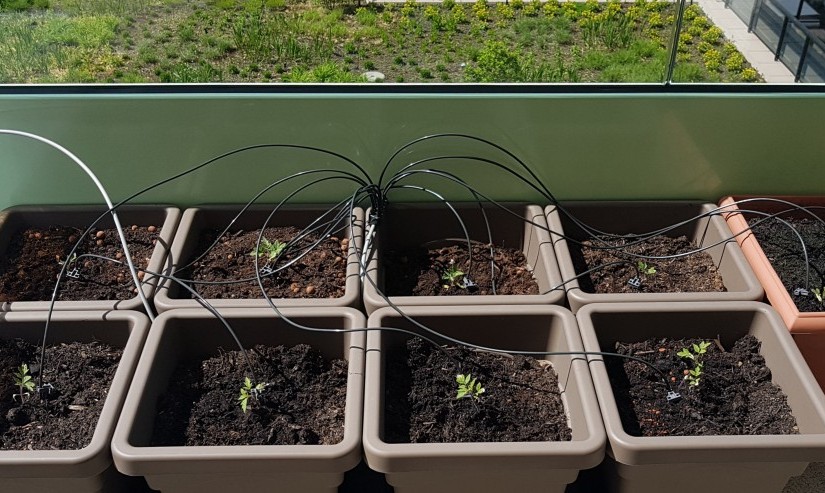
Gardena Urlaubsbewässerungs-Set is up and running. It was easy to install and operate: irrigation of the garden is now automatized however not fully controlled. Fixed amount of water delivered in every 24 hours. I am off to Greece/Croatia in July – and just cannot ask anyone to come to my place every single day.  If they survive my absence then I give you a report in August – after harvesting sweet and juicy tomatoes.

Motivation

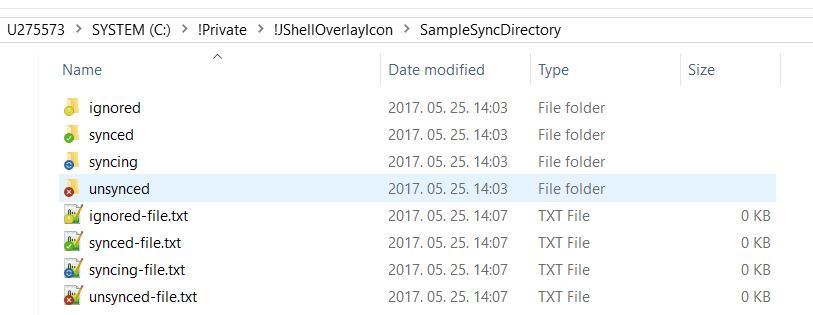
shell-overlay-icon-visual

As a developer of myCloud Desktop my mission is to overcome our competitors: Dropbox, OneDrive and Google Drive. The odds are against us but you never know: a year ago, no one thought we would get so far. Our beta period is over and the core functionality, the file synchronization is implemented. It is not perfect, we have some defects but we are on track: from week to week we release a better version of the app. To get to the next level I shared the results of this post with the PO – and he loved it since the product needs better integration to Windows and Mac OS. The app shows the current status, what kind of files are we transferring and how many transfers are pending but… overlay icons are superficially attractive and pleasing to the senses. They are still missing – but not for long.

How to do?

By using an Icon Overlay Handler we can tell Windows whether we want to use a specific icon for a file or not. I attempted to find an out-of-the-box solution and also keep the distance from other programming languages – not because I insist on Java but I did not want to add an another programming language to our already very heterogeneous project. But now I am quite sure that it is almost impossible without making our hands dirty.

Steps

  • Create a handler by implementing interface IShellIconOverlayIdentifier
  • Implement business logic in Java and call it from C#
  • Register handler as a COM Server
  • Force icon update from Java

Some trivial and irrelevant code fragments are removed from the code examples below. The complete sample project is available on GitHub: https://github.com/tornaia/blog-jshelloverlayicon

Create a handler by implementing interface IShellIconOverlayIdentifier

The documentation is clear: a specific interface must be implemented.

 [ComVisible(false)]
 [ComImport]
 [Guid("0C6C4200-C589-11D0-999A-00C04FD655E1")]
 [InterfaceType(ComInterfaceType.InterfaceIsIUnknown)]
 public interface IShellIconOverlayIdentifier
 {
    [PreserveSig]
    int IsMemberOf([MarshalAs(UnmanagedType.LPWStr)] string absolutePath, [MarshalAs(UnmanagedType.U4)] int attributes);

    [PreserveSig]
    int GetOverlayInfo(IntPtr iconFileBuffer, int iconFileBufferSize, out int iconIndex, out uint flags);

    [PreserveSig]
    int GetPriority(out int priority);
 }

GetOverlayInfo: the fully qualified path of the file containing the icon overlay image.
GetPriority: priority value to the handler’s icon overlay.
IsMemberOf: to determine whether it should display a handler’s icon overlay for a particular object.

ComVisible: indicates that the managed type is visible to COM. By default it is set to true.
ComImport: marks a class as an externally implemented COM class. COM coclasses are represented in C# as classes. These classes must have the ComImport attribute associated with them.
Guid: is used to specify a universally unique identifier (UUID) for a class or an interface.
ComInterfaceType.InterfaceIsIUnknown: indicates that an interface is exposed to COM.
PreserveSig: specifies whether the native return value should be converted from an HRESULT to a .NET Framework exception.

There are four different icons in the sample project and one implementation per icon is required. Repetition is usually bad so extract the shared code into an abstract class.

 [ComVisible(false)]
 public abstract class AbstractOverlayIconHandler : IShellIconOverlayIdentifier
 {
    [ComRegisterFunction]
    public static void Register(Type type)
    {
       RegistryKey registryKey = Registry.LocalMachine.CreateSubKey(@"SOFTWARE\Microsoft\Windows\CurrentVersion\Explorer\ShellIconOverlayIdentifiers\ " + type.Name);
       registryKey.SetValue(string.Empty, type.GUID.ToString("B").ToUpper());
       registryKey.Close();
       Shell32Utils.FileAssociationsChanged();
    }

    [ComUnregisterFunction]
    public static void Unregister(Type type)
    {
       Registry.LocalMachine.DeleteSubKeyTree(@"SOFTWARE\Microsoft\Windows\CurrentVersion\Explorer\ShellIconOverlayIdentifiers\ " + type.Name);
       Shell32Utils.FileAssociationsChanged();
    }
 }

One concrete implementation out of the four.

 [ComVisible(true)]
 [ClassInterface(ClassInterfaceType.None)]
 [Guid("19841221-F0EE-4A04-8E8C-0D8698CD0001")]
 public class MyCloud1SyncedOverlayIcon : AbstractOverlayIconHandler
 {
    public MyCloud1SyncedOverlayIcon() : base(@"icon_synced.ico")
    {
    }

    protected override bool IsHandled(string absolutePath, int attributes)
    {
       var fileStatus = SyncRestClient.GetFileStatus(absolutePath);
       return fileStatus == FileStatus.SYNCED;
    }
 }

IsHandled is up to you. In the current implementation we ask a Spring Boot app with an HTTP request to decide. The used icon must be next to the dll. If you want to use an absolute path then modify the constructor in AbstractOverlayIconHandler class accordingly. The Guid of the concrete implementations must be unique.

The handlers must finish with their code as fast as possible: while their code is running the UI will show nothing but white and dummy icons. What if our client app is not running? In every two seconds the handlers (see method CheckSyncClientPort) check whether someone is listening on port 8080 or not. To make it more robust a 2000 ms timeout is also added to the requests. Under normal conditions 1-10 ms is more than sufficient.

Implement business logic in Java and call it from C#

REST provides interoperability between the platforms. In the current implementation the JSON responses are very simple so I was not forced to add Newtonsoft.com/Json.NET or any other JSON framework to the solution thus the C# part depends only on .NET 2.0. It was released in 2005 and it is optional for Windows XP but starting with Windows 7 it is there.

Register handler as a COM Server

It is essential to know what kind of OS are we running on: Windows version (7/8/8.1/10) and both 32 and 64-bit systems are working fine with this example but to support all the combinations 4 different binaries must be compiled and registered respectively. These eye-candy visuals will not be there at all or just will not appear for some apps if you register inappropriately. Elevated privileges or disabled UAC is also necessary to execute the commands.

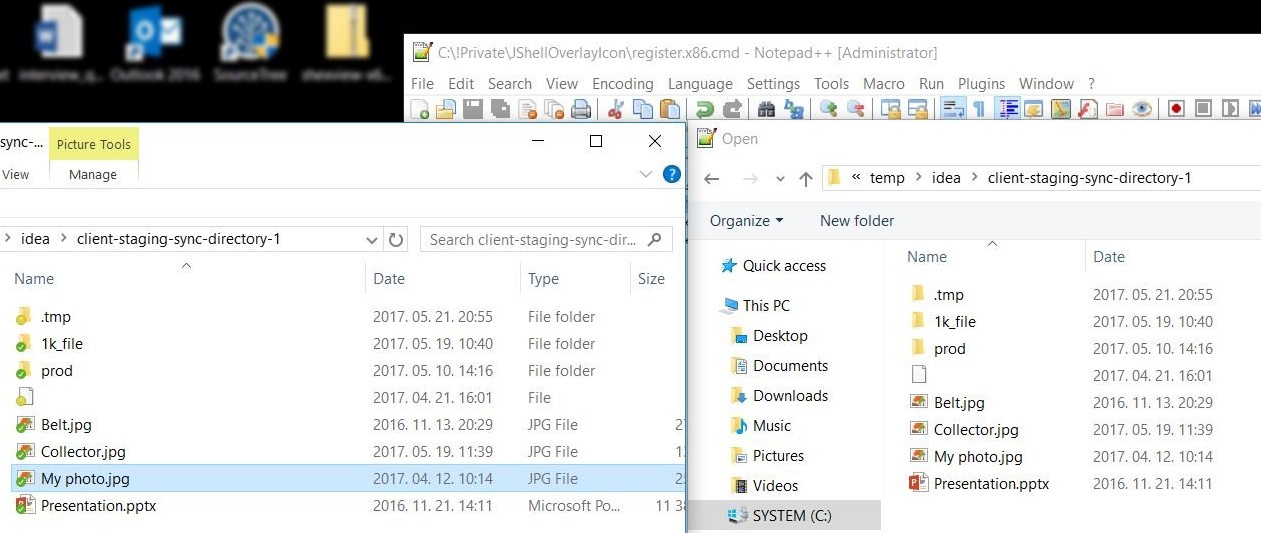
shell-overlay-icon-32-64-bit-issue
64-bit explorer with overlay icons on left side and 32-bit Notepad++ without icons on right: inappropriately registered handlers

In AbstractOverlayIconHandler.cs there are two important methods: Register(Type) and Unregister(Type) with attributes ComRegisterFunction and ComUnregisterFunction.

Regasm can register dll to Windows. Windows will invoke the method with ComRegisterFunction attribute. That method will create one registry entry (per icon handler) under SOFTWARE\Microsoft\Windows\CurrentVersion\Explorer\ShellIconOverlayIdentifiers. If you have Dropbox/OneDrive/TortoiseSVN/etc installed then you will see the handlers of those other applications too. Unfortunately there is a limitation within Windows: you cannot have more than 15 active handlers at the same time. What happens when we have more? Windows will go in alphabetical order – as a consequence developers started to put spaces in front of registry keys’ name. Today OneDrive has one space and Dropbox two – our one will put four.

.NET runtime is bundled into these Windows versions. While Windows 7 comes with v2.0.50727, Windows 8/8.1/10 come with v4.0.30319. The x64 versions will contain a runtime for x86 and an another for x64.

After registration it is also important to restart explorer.exe and all the applications where we want to see the icons. Or just restart the computer.

 @echo off
 echo Register for Win8/8.1/10 x64
 %SystemRoot%\Microsoft.NET\Framework64\v4.0.30319\regasm bin\x64\Debug\JShellOverlayIconHandler.net4.x64.dll /codebase
 echo Kill all explorer.exe instances
 taskkill /F /IM explorer.exe
 echo Restart explorer.exe
 explorer.exe
 echo Done

Unregistration works in the other way: after removing the keys from the registry the explorer and other applications must be restarted. See unregister.win8.71.10.x64.cmd for the details.

Force icon update from Java

Shell32 and its SHChangeNotify method will do the job. I found Java Native Access pretty handy and only some glue code was required:

 public void refreshOverlayIcon(Path path) {
    String absolutePath = path.toFile().getAbsolutePath();
    Pointer filePointer = new NativeString(absolutePath).getPointer();
    Shell32.INSTANCE.SHChangeNotify(new WinDef.LONG(SHCNE_UPDATEITEM), new WinDef.UINT(SHCNF_PATHW), new WinDef.LPVOID(filePointer), new WinDef.LPVOID(Pointer.NULL));
 }

where SHCNE_UPDATEITEM and SHCNF_PATHW are just constants. You cannot pass directly a String reference to Windows so you have to allocate some memory first, write the String/wchar_t* there and pass just a pointer. If you are interested in the details check NativeString.java.

Traps

  • dll(s) will be locked by Windows after regasm is called, so unregister before rebuild – otherwise Visual Studio will give you an error like this: Unable to copy file “obj\x64\Debug\JShellOverlayIconHandler.dll” to “bin\x64\Debug\JShellOverlayIconHandler.dll”. The process cannot access the file ‘bin\x64\Debug\JShellOverlayIconHandler.dll’ because it is being used by another process.
  • Debugging is difficult. What helped me out in some situations is the Files.AppendAllText method.
  • Use Visual Studio 2017 instead of JetBrains’ Rider. I failed to build 32-bit dll with Rider. I am not blaming it since it is just a pre-release software at the moment. What is more: I switched to VS in 5 minutes.

Large Scale Refactor III. – Maven

From an earlier chapter of the blog. Kept for the record.

Niceties in my life: participating in an another superb wedding party, settling down in an almost new apartment in the heart of the preferred area – Grüezi von Opfikon! – and assembling furnitures there. I dedicate this post to my favorite piece of equipment: Nespresso Inissia and its invigorating effects.
The cover image was taken of the Kapellbrücke during our recent small trip to Luzerne.

Review

Now I have a small bunch of tests so I have a continuously growing and living specification. The following scenarios are supported:

  • moving dependency to a new/existing module (sibling, parent, child)
  • moving all java classes depending – even transitively – on the what if the from does not provide the referenced classes by any other dependency
  • resolving properties in maven coordinate (groupId, artifactId, version) tags even if there are inherited properties
  • dependencyManagement is taken into consideration
  • preliminary check: to might contain what but in this case the version must match otherwise the user is asked to resolve the conflict first
  • give insight to the user about the completed operations via Intellij’s Event Log panel

Glossary

what: trivial, the dependency you want to move
from: trivial, the maven module that includes the what
as/to: as is referring to a new, non-existing module while to is marking an existing one
parentTo: the parent of the as/to module

Small lessons learned

Do not use together two dependencies where both contain a class with the same FQCN

com.google.collections:google-collections:1.0 and com.google.guava:guava:18.0 both contain class com.google.common.collect.Iterables with method: void removeIf(Iterable, Predicate). In google-collections it has no modifier so its package-private while the guava provides this as public. This caused a runtime Error sometimes because the classloader found the stricter one:
java.lang.IllegalAccessError: tried to access method com.google.common.collect.Iterables.removeIf(Ljava/lang/Iterable;Lcom/google/common/base/Predicate;)Z

Spin-off: It should be an easy task to implement a validator by reusing the existing code to cover this scenario but at the moment I do not want to lose the focus.

No automated way to publish to JetBrains IntelliJ IDEA Plugin Repository

At the moment there is no automated way to publish a new version of a plugin to the official plugin repo  – according to their support page.

Spin-off: Let’s create a Jenkins plugin for this!

Use Idea’s built in diagram drawer

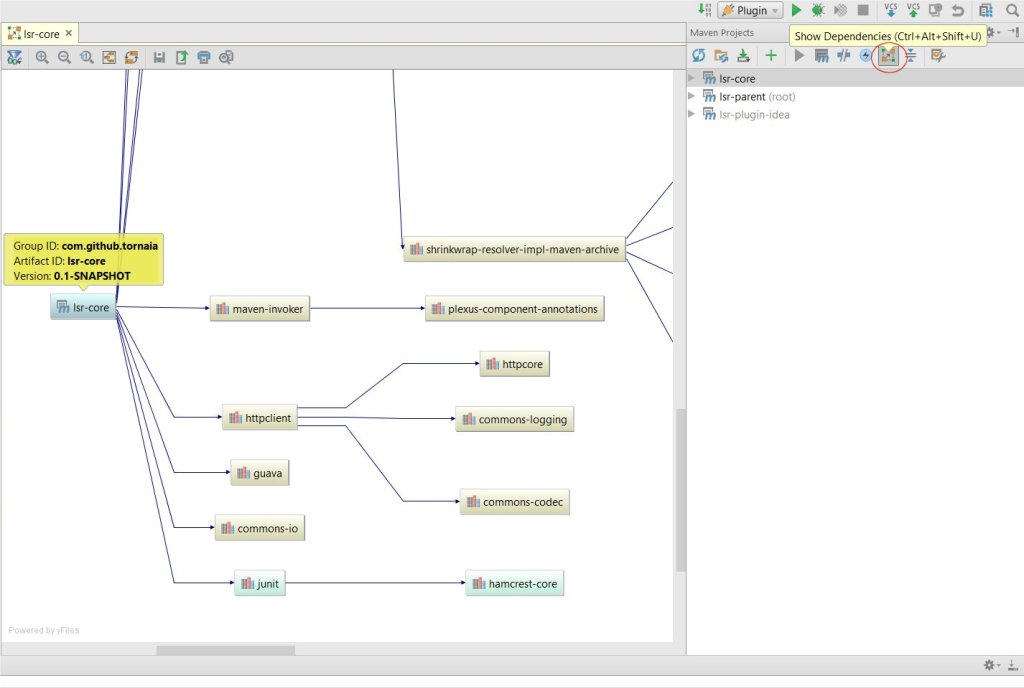
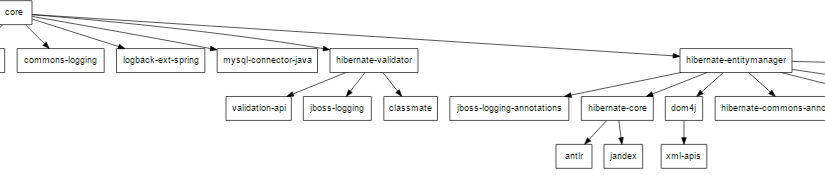
I used an another tool so far: com.github.ferstl:depgraph-maven-plugin. It was easy to integrate into a build process but it is not as handy as a fully integrated solution in an IDE.

maven-intellij-idea-maven-dependencies-diagram

Planning

Focus on splitting Java classes:
ClassAB depends on DepA and DepB. Let’s move DepB to an another module: split ClassAB into two: ClassA remains in the same place but ClassB must be moved to the new module. Update the dependencies of other modules, fix imports and references in Java classes. The code must compile after the transformation.

Epilogue

Do not think that even the highlighted scenarios are all well-rounded. I track all popping up idea within a Google spreadsheet and it is growing super fast. The more I work on this project the more idea I have and the more I realize how much I do not know about Java and Maven. Most of the time I have nothing but a dim and uncertain assumption.

Large Scale Refactor II. – PoC

From an earlier chapter of the blog. Kept for the record.

After travelling 1.5 hours by public transport from Zürich to Intschi and taking the cable car up to Arnisee the hiking finally started. The top, Sunniggrätli offers not just an amazing view but a small mountain hütte too: I have never had a lunch with such an amazing view. The cover image was taken from the dining table: no filters, no photoshop. At the end of the day we climbed – according to my FitBit Blaze – 296 floors, walked 19.9 Kilometers and burned 5453 calories. We took not just the aching toes home but a lifetime experience too. If you have the opportunity to hike in the Canton of Uri then do not hesitate!

First version

I published what I have so far on GitHub and my mind is really full with TODOs and FIXMEs. At the moment I strongly do not recommend to install it unless you want nothing but play with it.

I called three libraries for help: ShrinkWrap to resolve Maven dependencies, JavaParser and ASM to parse Java source and class files.

Some really basic scenarios are already implemented and covered with automated tests. I had two options: building up an object structure representing the Maven modules then executing the transformation steps on them. The other way is to create real Maven projects: folders and source files on the file system and using them as input and writing the results back to the disk. I voted for the second but implemented a few but real unit tests beside these high level ones.

Jenkins helped me to make the build more environment independent. Some issues immediately popped out: ignoring different line endings (CR, LF) and indentation is now solved.

large-scale-refactor-ui-first-version
I am aware of its ugliness

Next

A more aesthetic UI, much more handled scenarios and figure out how to push LSR to JetBrains IntelliJ IDEA Plugin Repository.

Large Scale Refactor I. – An idea

From an earlier chapter of the blog. Kept for the record.

I am sending out Anmeldeformular für Wohnen, Betreibungsauszug and Kopies auf der Aufenthaltsbewilligung once or sometimes twice each day mostly via e-mail rarely traditional post. Setting up appointments with landlords and actual tenants is my new favorite daily routine. Getting to know the city is just one benefit of searching for a new apartment, however I am now ready to leave behind this joy. Sooner or later it will happen… keep fingers crossed!

The problem

Do you know the single responsibility principle and separation of concerns? Have you ever had a huge and complex module where it – would – took tremendous of time to make the first cut or dependency extraction to simplify it?
Probably after some time you gave up for some reason. Maybe the next super important business feature must be implemented asap… and the code is rotten and more rotten. What if this redesign could be like method renaming? Shift + F6 or Alt + Shift + R!

An example

There is a huge module “core” with many dependencies: logging, persistence, web/servlet, etc…

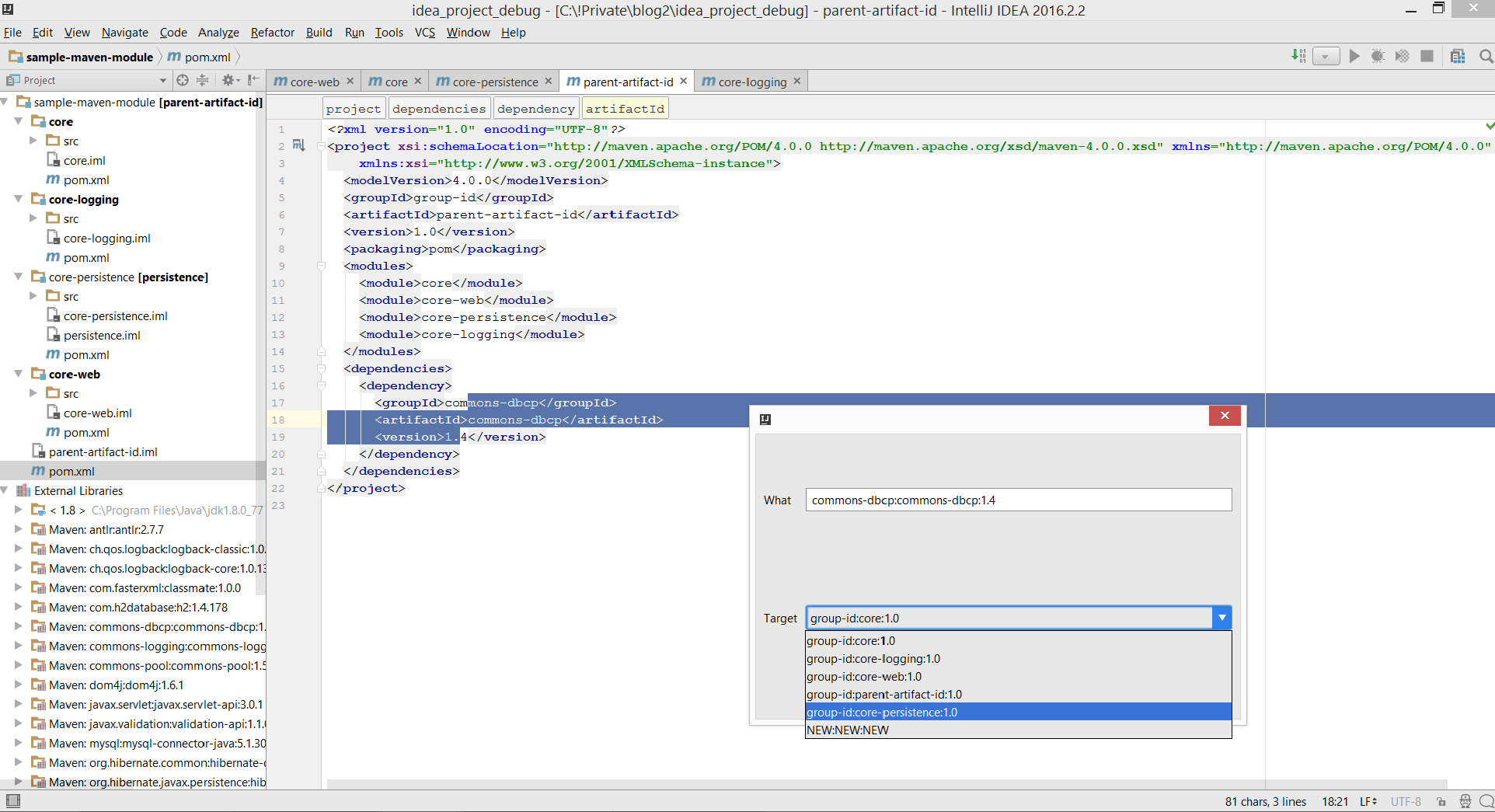
You want to move all logging related dependencies to a new “core-logging” module. So you select logback-core, logback-classic, slf4j-api, jcl-over-slf4j and with one click they are all moved to a new module as well as all the related classes.

As a next step you will move the hibernate/jpa/db/sql dependencies exactly like this to a new “core-persistence” module.

I know: it is a super easy and trivial example. What about really mean and complex scenarios? Will it work? Is this a good idea at all?

Next

A primitive POC is under development and at first I will create a simple plugin for IntelliJ IDEA around it. It will be publish on GitHub soon!

SonarQube and C#: drill down results of test cases

From an earlier chapter of the blog. Kept for the record.

The sparkling blue of the Adriatic has gone but the brown skin and memory remains. This year we focused on Istria: Pula, Mali Lošinj and Osor. Sailing this region of Croatia and the island hopping with a Hanse 385 Cruiser was a perfect summer adventure.
But the vacation is over and now I am heading from Budapest back to Zürich on the ÖBB Railjet 162: plenty of time to prepare this post!


The Question

I cloned https://github.com/SonarSource/sonar-examples.git then opened a command prompt under SonarSource/sonar-examples/tree/master/projects/languages/csharp and ran the following commands (based on Unit Test Execution Results Import (C#, VB.NET)):

MSBuild.SonarQube.Runner.exe begin /k:"org.sonarqube:csharp-simple-sq-scanner-msbuild" /n:"C# :: Simple Project :: SonarQube Scanner for MSBuild" /v:"1.0" /d:sonar.cs.xunit.reportsPaths="%CD%\XUnitResults.xml"
MSBuild.exe /t:Rebuild   
packages\xunit.runner.console.2.1.0\tools\xunit.console.exe XUnitProject1\bin\Debug\XUnitProject1.dll -xml %CD%\XUnitResults.xml
MSBuild.SonarQube.Runner.exe end

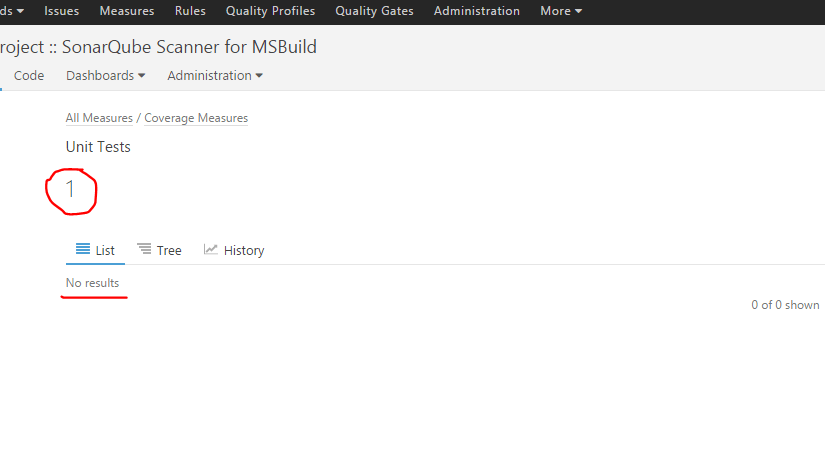
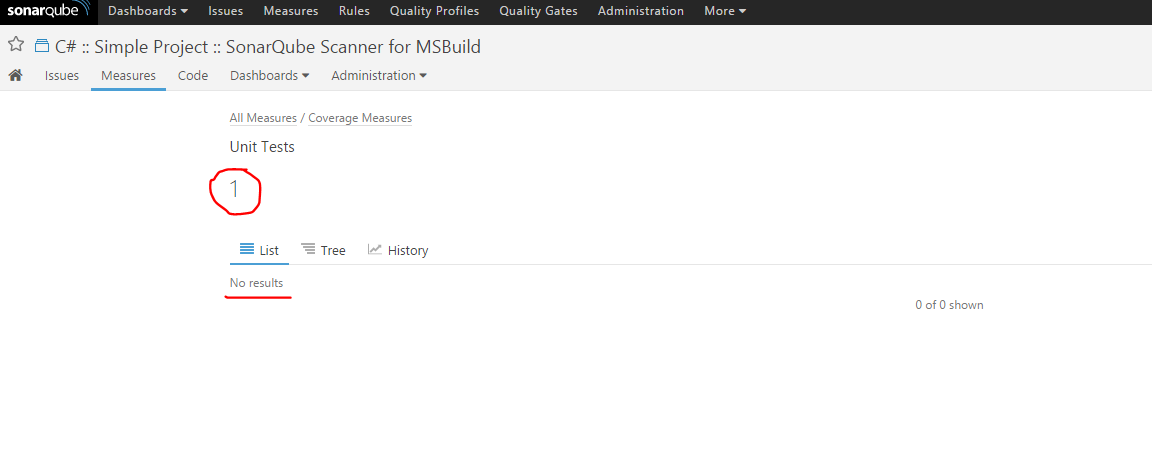
Under metric/tests/list I get “Unit Tests 1” and that is OK but beneath it the list is empty:

WWzgb

I simply did not understand why I was not able to drill down the test results of this C# project. I found nothing suspicious in the logs:

INFO: Sensor org.sonar.plugins.csharp.CSharpUnitTestResultsProvider$CSharpUnitTestResultsImportSensor
INFO: Parsing the XUnit Test Results file C:\workspace\SonarSource-sonar-examples-92828b2\projects\languages\csharp\XUnitResults.xml
INFO: Sensor org.sonar.plugins.csharp.CSharpUnitTestResultsProvider$CSharpUnitTestResultsImportSensor (done) | time=15ms

It bothered me so much I asked around on the official SonarQube mailing list too. I got one response… at least I was not alone with the issue. It is more than nothing. I gave Stack Overflow a chance too but no luck so I started to do the dirty job.


The Investigation

Comparing the JSON responses

I re-used two very simple projects with the help of SonarSource/sonar-examples: a Java and a C# one. I pushed the results of both to a local SonarQube instance and then compared the JSON responses.

C#:

{  
   "paging":{  
      "pageIndex":1,
      "pageSize":100,
      "total":0
   },
   "baseComponent":{  
      "id":"AVV6fdxDjdEPPoHbjrEx",
      "key":"org.sonarqube:csharp-simple-sq-scanner-msbuild",
      "name":"C#MSBuild",
      "qualifier":"TRK",
      "measures":[  
         {  
            "metric":"tests",
            "value":"1",
            "periods":[  
               {  
                  "index":1,
                  "value":"0"
               },
               {  
                  "index":2,
                  "value":"1"
               },
               {  
                  "index":3,
                  "value":"0"
               }
            ]
         }
      ]
   },
   "components":[  

   ]
}

Java:

{  
   "paging":{  
      "pageIndex":1,
      "pageSize":100,
      "total":1
   },
   "baseComponent":{  
      "id":"AVZADqxkeSE9GOvlogza",
      "key":"org.sonarqube:example-ut-maven-jacoco",
      "name":"JavaUT",
      "qualifier":"TRK",
      "measures":[  
         {  
            "metric":"tests",
            "value":"2",
            "periods":[  
               {  
                  "index":1,
                  "value":"2"
               },
               {  
                  "index":2,
                  "value":"2"
               },
               {  
                  "index":3,
                  "value":"2"
               }
            ]
         }
      ]
   },
   "components":[  
      {  
         "id":"AVZADq5p6Qz7lWVR41QW",
         "key":"org.sonarqube:example-ut-maven-jacoco:src/test/java/example",
         "name":"src/test/java/example",
         "qualifier":"DIR",
         "path":"src/test/java/example",
         "measures":[  
            {  
               "metric":"tests",
               "value":"2",
               "periods":[  
                  {  
                     "index":1,
                     "value":"2"
                  },
                  {  
                     "index":2,
                     "value":"2"
                  },
                  {  
                     "index":3,
                     "value":"2"
                  }
               ]
            }
         ]
      }
   ]
}

Wrong way. The data is just not there thus it can not be a UI bug.


Debugging the backend

I cloned the Git project of SonarQube and opened it with IntelliJ IDEA.

Starting the Sonar instance in debug was easy:

%SONAR%/conf/wrapper.conf:

wrapper.java.additional.1=-Djava.awt.headless=true -Xdebug -Xrunjdwp:transport=dt_socket,server=y,suspend=n,address=1044

%SONAR%/conf/sonar.properties:

sonar.web.javaAdditionalOpts=-Xdebug -Xrunjdwp:transport=dt_socket,server=y,suspend=n,address=1045

After debugging the pits of hell I got the feeling that the backend is somehow OK but the required data is just not there.


Analyzing the C# plugin

What about SonarQube’s C# plugin? I read the docs and found something:

Drilldown on Test Execution Results is not supported
Tests execution results will be displayed on project level dashboards.

Gotcha! From this point the events sped up:

It is not a bug or configuration issue. I posted my findings to the Stack Overflow and to the mailing list too.


Next?

I keep my eyes open and watching these open tickets and mailing lists.


Update

  • SONARCS-657 – Import test cases and attach them to their corresponding test source files (allow to drill down) – Closed and Won’t fix